Wall Panel Visualizer: Transform Your Space Before You Buy
Choosing the right wall panels for your space can feel overwhelming. With so many textures, finishes, colors, and styles available, it’s hard to imagine how everything will come together in your actual room. This is where a wall panel visualizer changes the game.
Instead of guessing or relying on small samples, you can now see exactly how different wall panels will look in your own space—instantly. Whether you’re a homeowner redesigning your living room or a brand trying to improve customer experience, this technology is reshaping how decisions are made.
Let’s explore how a wall panel visualizer works, why it matters, and how it can completely transform the buying journey.
What is a Wall Panel Visualizer?
A wall panel visualizer is a digital tool that allows users to preview wall panel designs in real-life environments. You can either upload an image of your room or choose from preset spaces, then apply different panel styles to see how they look.
Instead of imagining, you experience.
This tool uses AI and image processing to map surfaces like walls accurately, ensuring that textures, lighting, and proportions feel realistic.
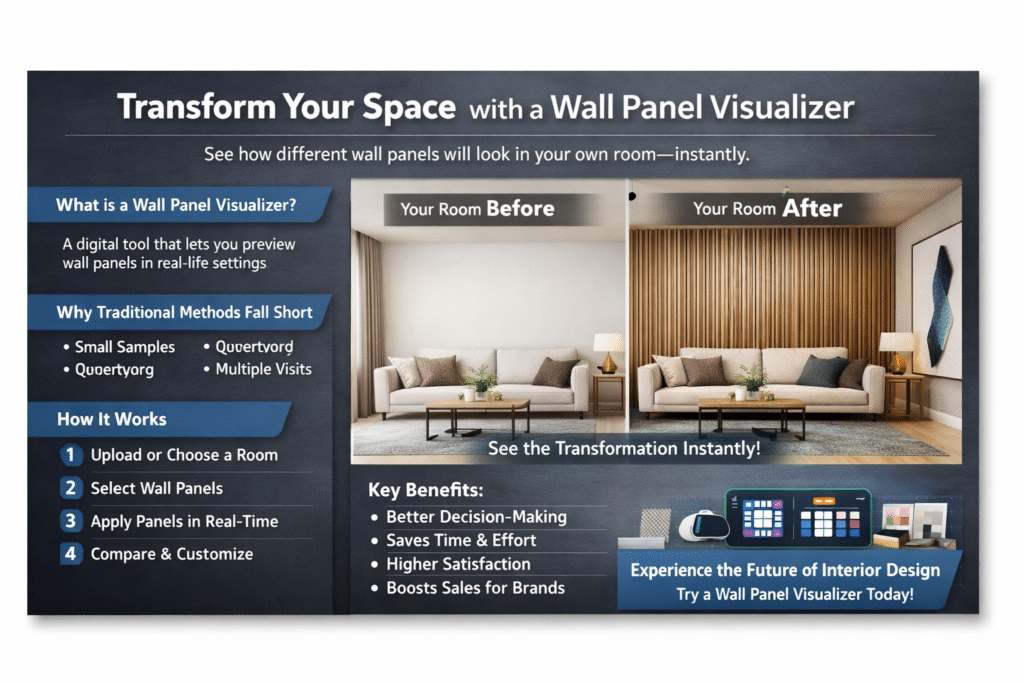
Why Traditional Selection Methods Fall Short
Before visualizers, the process looked something like this:
- Visit a showroom
- Look at small samples
- Try to imagine the final result
- Make a decision with uncertainty
This approach creates friction and doubt. Many customers hesitate because they’re unsure if the final output will match their expectations.
A wall panel visualizer eliminates that uncertainty by providing a clear, visual preview before purchase.
How a Wall Panel Visualizer Works
1. Upload or Choose a Room
Users can upload a photo of their own space or select from a library of professionally designed rooms.
2. Select Wall Panels
Browse through different panel designs—wood, PVC, 3D panels, textured finishes, and more.
3. Apply Panels in Real-Time
The visualizer maps the selected panel onto the wall surface, adjusting for perspective, lighting, and depth.
4. Customize and Compare
Switch between designs, compare styles, and experiment until you find the perfect fit.
This entire process takes minutes, not days.
Benefits of Using a Wall Panel Visualizer
1. Better Decision-Making
Seeing a design in your own space removes guesswork. You can confidently choose what actually works rather than what looks good in isolation.
2. Saves Time and Effort
No more multiple showroom visits or back-and-forth discussions. Everything can be explored digitally in one place.
3. Higher Satisfaction
When customers know exactly what they’re getting, the chances of dissatisfaction drop significantly.
4. Increased Sales for Brands
For businesses, offering a wall panel visualizer improves conversions. Customers who can visualize products are far more likely to buy.
Real-World Example
Imagine you’re redesigning your bedroom wall. You’re confused between a wooden slatted panel and a modern 3D geometric panel.
Without a visualizer, you’d have to rely on imagination.
With a wall panel visualizer, you can:
- Upload your bedroom image
- Apply both designs
- Compare them side by side
You might realize that while the geometric panel looks great on its own, the wooden panel complements your furniture better.
This clarity leads to smarter decisions.
How Brands Are Leveraging This Technology
Modern brands are integrating visualizers directly into their websites and showrooms.
For example, platforms like Nirwana.ai enable wall panel brands to provide an interactive experience where customers can explore designs in real-time. Instead of just browsing a catalog, users actively engage with products.
This shift is powerful because it turns passive browsing into an immersive experience.
Key Features to Look For in a Wall Panel Visualizer
Accurate Surface Detection
The tool should correctly identify walls and apply panels realistically.
High-Quality Rendering
Textures, lighting, and shadows should look natural—not artificial.
Easy-to-Use Interface
Users should be able to navigate without any technical knowledge.
Multiple Design Options
A wide catalog ensures users can explore different styles.
Comparison Mode
The ability to compare multiple designs side by side is a major advantage.
Who Should Use a Wall Panel Visualizer?
Homeowners
Perfect for anyone planning renovations or interior upgrades.
Interior Designers
Helps present ideas to clients more effectively and close projects faster.
Architects
Useful for conceptualizing designs during the planning phase.
Wall Panel Brands & Retailers
A wall panel visualizer enhances customer experience and drives more conversions.
The Future of Interior Design Decisions
Technology is rapidly changing how we design and buy for our spaces. Visualizers are just the beginning.
Soon, we’ll see even more advanced features like:
- AR-based real-time previews
- AI-driven design suggestions
- Fully immersive virtual showrooms
Tools like those offered by Nirwana.ai are already moving in this direction, helping brands create seamless and interactive buying journeys.
Common Mistakes to Avoid
Even with a visualizer, users should be mindful of a few things:
- Ignoring lighting differences between digital previews and real life
- Not considering furniture and decor alignment
- Overcrowding designs without balance
A wall panel visualizer is powerful, but thoughtful design decisions still matter.
Conclusion
A wall panel visualizer is no longer a luxury—it’s becoming a necessity in modern interior design. It removes uncertainty, speeds up decision-making, and creates a more confident buying experience.
Whether you’re a homeowner exploring options or a brand looking to stand out, adopting this technology can make a significant difference.
If you haven’t tried it yet, now is the perfect time to explore how a wall panel visualizer can simplify your design journey and help you make better choices with complete clarity.